
Neat, consistent Markdown.
Coming from markdownlint?
mdsmith init --from-markdownlint converts your config —
follow the migration guide.



mdsmith checks style, readability, structure, and cross-file integrity — and auto-fixes what fixes cleanly.
Checks the whole tree.
Where other linters stop at per-file style, mdsmith checks the whole tree: it grades readability, ties files together with links, includes, and schemas, keeps generated sections in sync, and gates the result in CI — all from one engine that runs the same in your editor, your agent, and your pipeline.
Clean, consistent Markdown
Auto-fix Markdown formatting
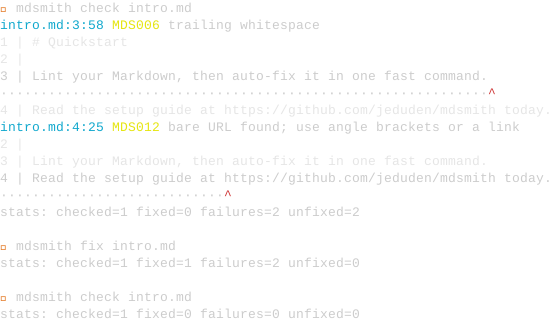
mdsmith fix rewrites whitespace, headings, code fences, bare URLs, list indentation, and table alignment in place, looping up to 10 passes and stopping when edits stabilize. mdsmith check is the read-only CI sibling.
Conventions and flavors
Pin a Markdown convention to get a curated rule preset and a target renderer flavor in one switch. MDS034 flags syntax the flavor will not render; a placeholder vocabulary spares template tokens.
Size and readability limits
Cap file, section, and token-budget size; enforce reading grade and sentence count; flag verbatim copy-paste across files.
One engine, every surface
Editors and agents
A VS Code extension and Claude Code plugins run the same rule engine, so diagnostics, quick-fixes, and navigation reach your editor and your agent.
Learn more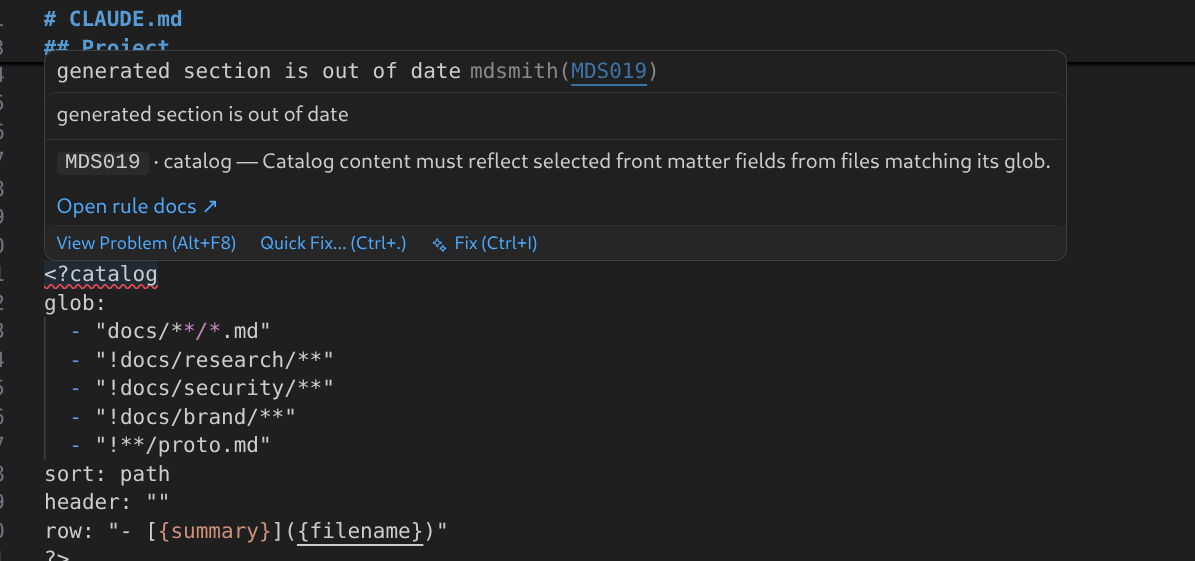
Live diagnostics wherever you write
mdsmith lsp emits diagnostics, quick-fixes, and navigation — definition, references, symbol search, and a call-hierarchy over <?include?>, <?catalog?>, and cross-file links — consumed by any LSP-aware editor.
Fast on every run
A single static Go binary, no runtime to start. The workspace walk runs in parallel, embeds are linted once, and check is built for the hot path — an order of magnitude faster than Node markdownlint, with a CI gate against regression.
Installs everywhere
One version-stamped Go binary ships through go install, npm, pip, uvx, mise, asdf, and GitHub Releases — with no postinstall network call, so locked-down CI installs offline.
Learn moreA connected docs tree
Cross-file integrity
Built-in rules flag broken links and missing anchors, enforce per-file section schemas, and keep Markdown in the right folders. Schemas can be inline on a file kind or shared via proto.md files.
Rename and move without breaking links
Rename a heading and every workspace anchor link that points at it is rewritten in one atomic edit. Link-reference labels rename with their uses. Move a whole file and every incoming link, ref-def, and outbound relative link is rewritten while git mv stages the rename. A colliding slug fails loudly instead of silently breaking cross-file links.
See the dependency graph
mdsmith deps lists what a file pulls in — includes, catalogs, build inputs, and links — or, with --incoming, every file that points at it. The LSP call-hierarchy walks the same graph in your editor.
File kinds and schemas
Tag each file with a kind, then validate its headings and front matter against a schema declared inline on the kind or shared via a proto.md template — so a whole directory obeys one contract.
Markdown as a single source of truth
Self-maintaining sections
On mdsmith fix, <?toc?> rebuilds a heading TOC, <?catalog?> generates an index from front matter, and <?include?> splices in another file. A Git merge driver auto-resolves conflicts inside those blocks.
Agent-ready docs index
A <?catalog?> in CLAUDE.md keeps one summary line per tracked doc, so an agent reads a few thousand tokens of metadata up front and opens only the files a task touches.
Build artifacts in sync
The <?build?> directive declares an artifact and a recipe. mdsmith fix keeps the section body in sync with the recipe output; MDS040 shell-safety-checks the recipe without running it.
Markdown as a data source
mdsmith extract projects a schema-conformant Markdown file into a JSON, YAML, or msgpack data tree; mdsmith export writes a portable, directive-free copy that renders anywhere.
Built for your pipeline
Gate releases on doc status
mdsmith list query 'status: "✅"' plan/ selects files by a CUE expression on front matter; mdsmith metrics rank ranks files by any shared metric — both ready to pipe into a release script.
Git-native, conflict-free
A Git merge driver auto-resolves conflicts inside generated blocks, and a pre-merge-commit hook re-runs mdsmith fix and re-stages the result, so generated content never blocks a merge.
Config you can explain
Config layers deep-merge rule by rule: defaults, convention, kinds, then overrides. --explain and mdsmith kinds resolve show which layer set each effective value, per leaf.
Quality you can verify
CI badge, Go Report Card grade, and Codecov coverage badge report live project health. mdsmith lints its own docs with the rules it ships, and a coverage gate blocks any merge that drops below the line.
Learn moreCopy one line for your platform.
Filter by your platform, then copy the one line you need — each command installs the latest release. The install guide adds editor setup, verification, and version-pinned forms for CI.
$ go install github.com/jeduden/mdsmith/cmd/mdsmith@latest
$ npm install -g @mdsmith/cli
$ npx @mdsmith/cli check .
$ pip install mdsmith
$ uvx mdsmith check .
$ pipx install mdsmith
$ brew install jeduden/mdsmith/mdsmith
$ mise use github:jeduden/mdsmith
$ asdf plugin add mdsmith https://github.com/jeduden/asdf-mdsmith.git
$ curl -LO https://github.com/jeduden/mdsmith/releases/latest/download/mdsmith-<os>-<arch>
$ scoop install mdsmith
$ code --install-extension jeduden.mdsmith
$ codium --install-extension jeduden.mdsmith
$ curl -LO https://github.com/jeduden/mdsmith/releases/latest/download/mdsmith-x86_64.flatpak && flatpak install ./mdsmith-x86_64.flatpak
$ unzip mdsmith-obsidian-<version>.zip -d <vault>/.obsidian/plugins/mdsmith/
Releases are Sigstore-signed and checksummed; npm and PyPI publish via OIDC Trusted Publishing. The install guide lists verification steps for each install method.